Nissan GT-R (R35) [+Add-on]
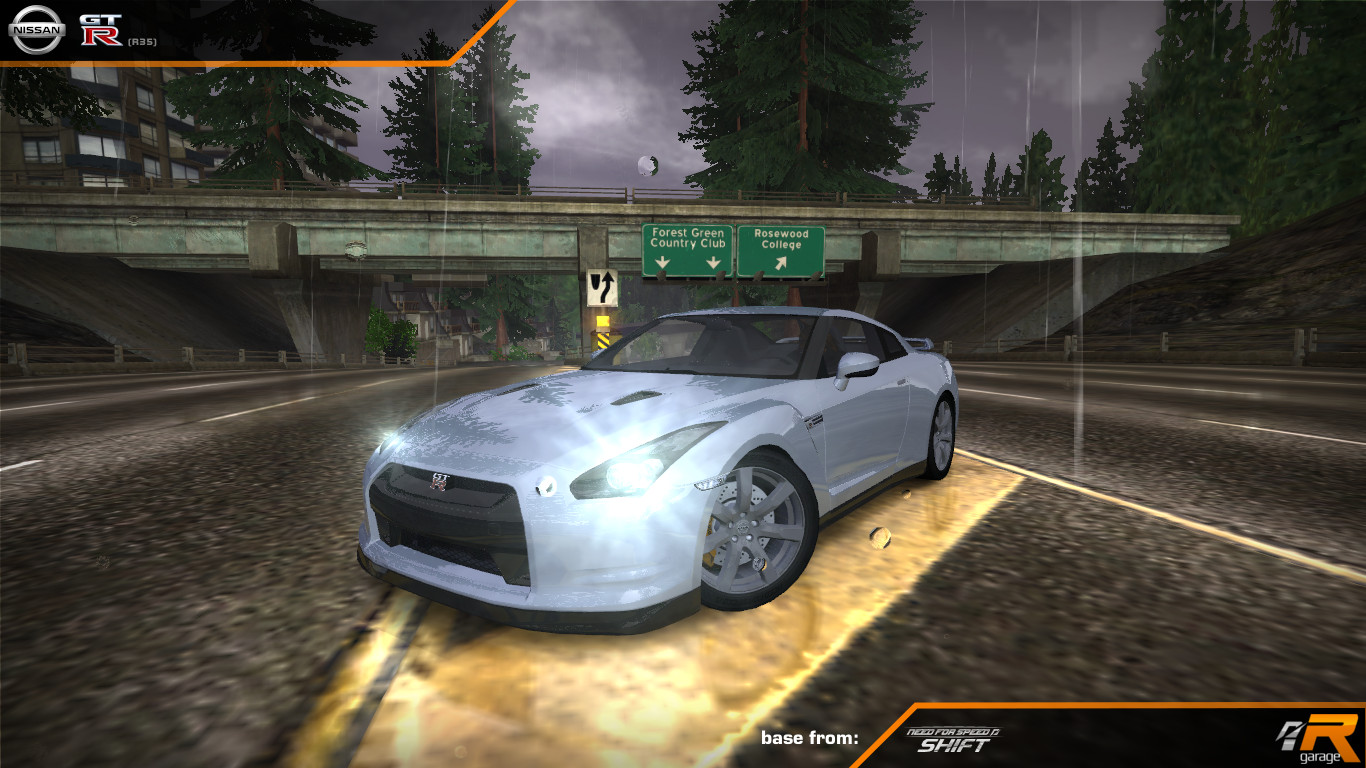
v1.0 Rev. A: fixed copspeech for add-on version.
base from NFS Shift, with some parts from NFSPS and NFSUC / Modloader version replaces A4 / Add-on version incompatible with Modloader
Features:
Can be customized with:
Bodykits
Spoilers
Hood/rollcage combo
Rims
Paint
Vinyls (debug map included; custom body and stripe vinyl included)
Decals
Tinted windows
Other features:
Performance: 195 mph (315 km/h) top speed -stock- / 243 mph (391 km/h) -upgraded-
LOD0 interior
Custom driver (werewolf)
Installation:
Modloader version:
Make sure you have the NFSMW Modloader installed
Move the ADDONS folder to your NFSMW folder. Delete any mod replacing A4 first.
Add-on version (make backups first!):
Make sure you have NFSMW Unlimiter installed first
Get Ed The Car Dealer to add the GLOBALB entries. To do so:
Move the GTRR35.ini file to the Config\NFSMW folder of Ed
Move the CARSELECT_MANUFACTURER_NISSAN.dds and SECONDARY_LOGO_GTRR35.dds files to the Resources\NFSMW\FrontEnd\FrontEndTextures\729181AD folder of Ed
Run Ed, open your NFSMW folder and click on the Add Cars button.
With NFS-VltEd, import the Nissan GT-R (R35) Setup.nfsms file, select Install Car (Files and Settings), click Install and save
To use add-on cars you should either create a new savefile or patch your existing savefile with the Save Patcher and Save Editor tools. Patch the save first then open the save with the save editor and save it.
Used tools:
Zmodeler 1.07b & 2.2.6 | QuickBMS | NFS CarToolkit v2 | GIMP | NFS TexEd | DXTBmp | NFSMW ModTools (with nlgzrgn's custom geometry compiler) | NFSU2 Texture Compiler (including ASC custom ARGB/DXT5 variant) | BinViewer | Notepad | NFS VLTEd | MWInside Model Recompiler
Copyrights/permissions:
If you would like to modify and/or distribute this mod, please:
keep this readme file without any alterations whatsoever (in case of just sharing this mod around)
give me proper credit (AJ_Lethal) for creating the mod
Seriously, respecting those conditions is not hard at all. Unless you're terminally dumb or a shameless, talentless hack.


Comments

AJLethal (August 26, 2026 @ 21:35)
@epox:1) I don't "think" it works: I actually tested it in a vanilla install.
2) You say there's an Anime livery selection; this car (and the Binary compatibility installer I linked in the description) was made before Extra Customization was introduced and as such doesn't have additional customization compared to a vanilla car; I don't know if you installed other mods prior to the R35 that might be conflicting with the car (or using a pre modded copy like Redux and such).

epox (August 26, 2026 @ 19:32)
@AJLethal Care to read this I installed it via Binary and VltEd, first VltEd script import then the Binary V2 endscript installation process in User mode but it does not matter since you just think it works classic also there is an "Anime" livery selection with nothing inside lol if you cared less enough to forget that part at least give info about it that it is a weebified half borked R35 addon so I can avoid it not sure if it is supposed to have anything inside there as well but thankfully it was empty.
AJLethal (August 25, 2026 @ 03:13)
@epox: care to tell me what steps did you take to install the car? because i just did so using the binary v2 compat pack and the car works fine.
epox (August 24, 2026 @ 13:58)
Tons of errors in V2 Binary Install the one included in this file just does not even apply the secondary texture logo and crashes in special livery selection in both .end scripts