Eddie's Eastsiders Skyline Vinyl
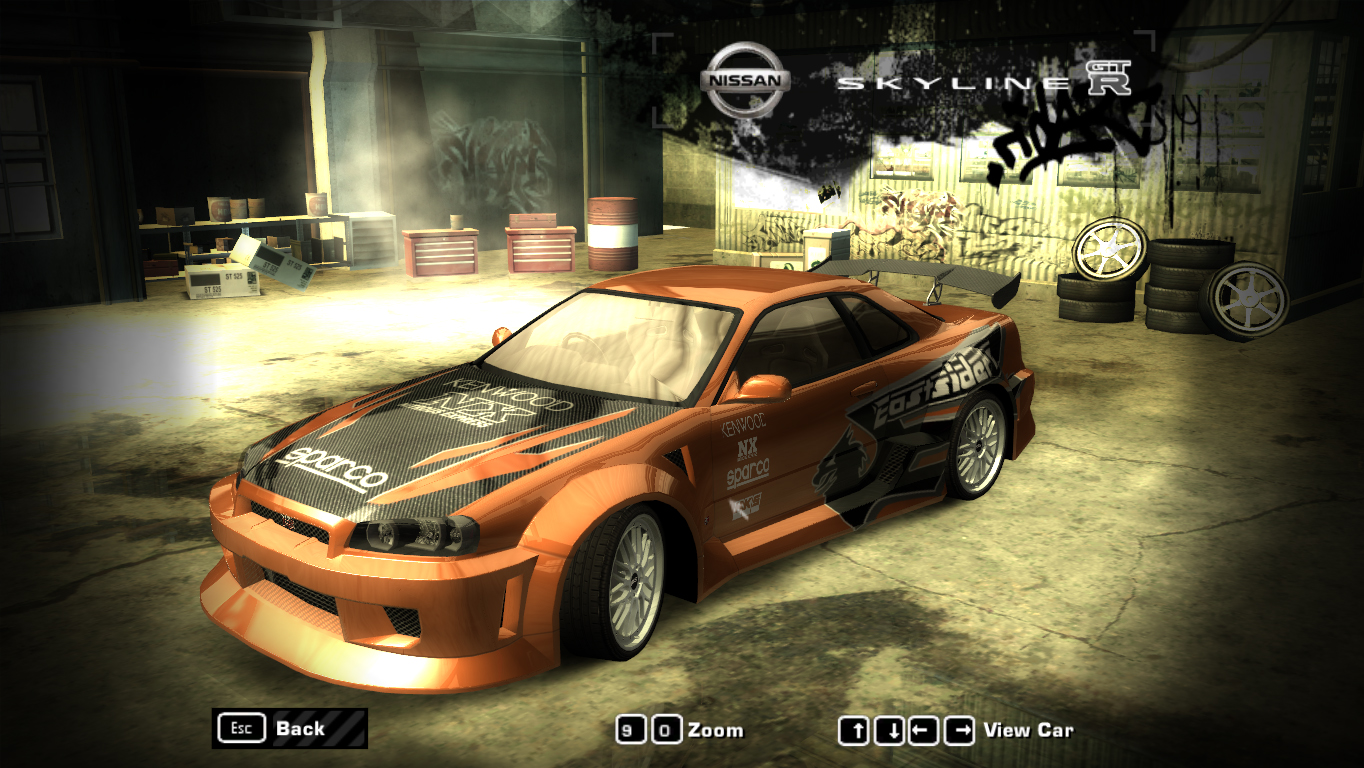
This is the first time I made vinyl for the 2005 Need for Speed Most Wanted, I hope you enjoy it!
I made two size resolution for this vinyl.
- 512px (lowest resolution)
- 1024px (highest resolution)
The tool you must be used to put this vinyl.
NFS TexEd
https://nfs-tools.blogspot.com/p/downloads.html
This vinyl only can be used for Zvott96's Nissan Skyline GT-R R34 car mod.
https://nfsmods.xyz/mod/732.
Installation:
1. Add Nissan Skyline GT-R R34 car mod by Zvott96 first
2. Open NFS TexEd
3. After you open NFS TexEd, click File > Open, and find the Skyline's VINYL.BIN on your NFSMW folder directory > CARS > SKYLINE
4. Find SKYLINE_PSRTEST and SKYLINE_PSRTEST_MASK.
5. If you have found it, click SKYLINE_PSRTEST and open Texture > Replace and choose my vinyls with the same name.
6. After you replaced SKYLINE_PSRTEST, replace SKYLINE_PSRTEST_MASK in the same way.
7. Save the vinyls with Ctrl + S or File > Save.
8. Done!
If you found something weird on the vinyl, please tell me in the comment section below.
Comments

