Rockport Outbreak FX
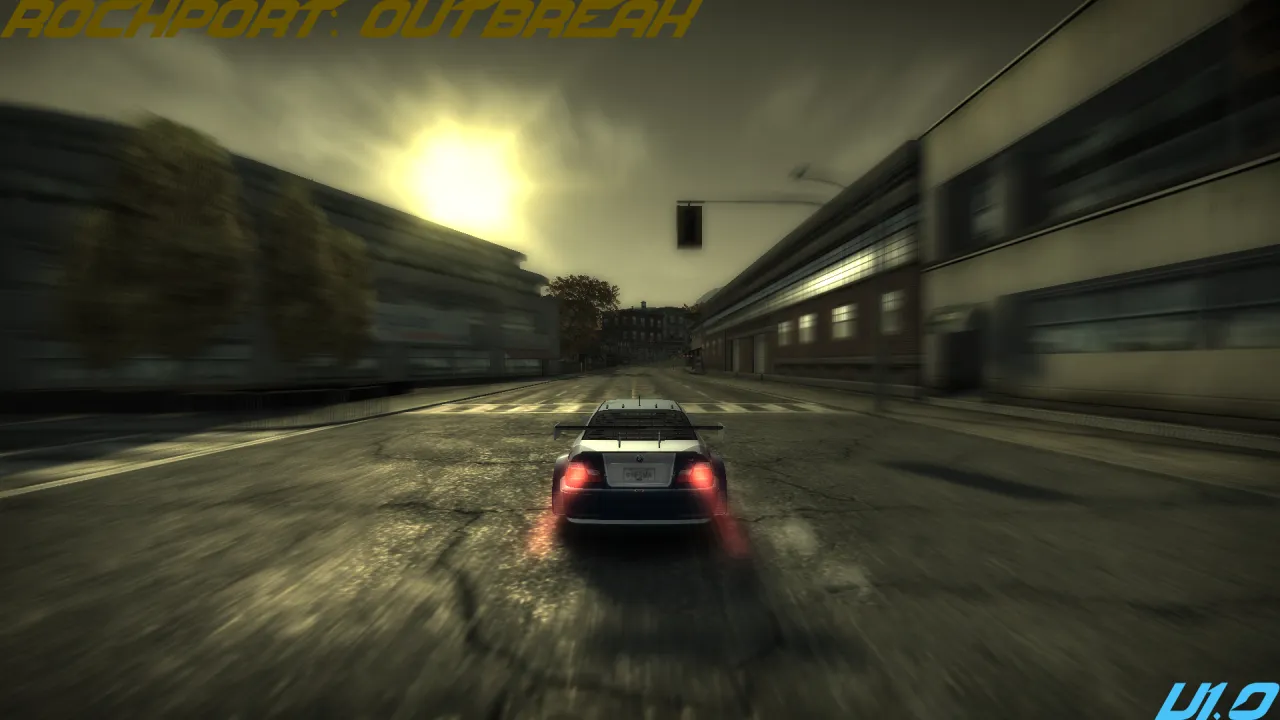
Rockport Outbreak FX is a custom RockportFX preset for Need for Speed: Most Wanted (2005) that turns Rockport City into a darker, stormier, infected-looking environment inspired by the Dead Island endgame weather style.
This preset is not meant to be a normal vanilla MW visual improvement. It is more of an atmospheric experiment that pushes the game toward a dirty green-gray storm look, with muted colors, toxic yellow bloom, heavy haze, darker skies, and a more abandoned/quarantine-like mood.
The goal is to make Rockport feel less like a normal racing city and more like a city sitting under a strange, sickly storm front.
What it changes / tries to do
- Gives Rockport a dark green-gray storm atmosphere
- Adds a dirty yellow-green bloom tint
- Makes the world look more desaturated and bleak
- Changes lighting to feel more toxic, humid, and infected
- Adds stronger haze/fog for a more oppressive look
- Makes roads, buildings, sky, and distant scenery feel more like an outbreak/endgame weather scenario
- Works especially well during cloudy, stormy, or low-light conditions
This was originally made while experimenting with OPM PS2 demo-style visuals, but it ended up becoming its own separate Dead Island-inspired Rockport preset.
Requirements
- Need for Speed: Most Wanted (2005) PC
- RockportFX
- A working modded MW setup
- Recommended: Xbox 360 Stuff Pack 4.1
This preset was made and tested with Xbox 360 Stuff Pack 4.1, so results may look different on vanilla PC or other visual/texture packs.
Installation
[list=1]
[*]Install RockportFX first:
https://www.nfsaddons.com/downloads/nfsmw/tools/11078/rockport-fx.html
[*]Launch the game at least once with RockportFX so it creates its preset/settings files.
[*]Go to your RockportFX preset/settings folder.
[*]Back up your current .nfsms preset file.
[*]Place this preset file into the RockportFX preset folder.
[*]Load the preset through RockportFX in-game by pressing F11 and choosing this preset.
[*]Adjust Time of Day / Weather in RockportFX if needed.
[/list]
Notes
This preset is intentionally stylized. It may look too dark, too green, or too hazy depending on your setup, monitor, ReShade, texture mods, or Extra Options settings.
If the bloom feels too strong, try lowering:
- ColourBloomIntensity
- BlackBloomIntensity
- FogInLightScatter
If the image feels too dark, try raising:
- EnvSkyBrightness
- AmbientColour
- FogSkyColourScale
Credits
Preset created by eatincrispies / XeroAbsolute.
Requires RockportFX by CIPHER and contributors.
Special thanks to the RockportFX team for making real-time visual editing possible in Most Wanted.
Comments

CIPHER (May 23, 2026 @ 22:36)
Yoo this preset is cooking 🔥Fyi: you dont need to include #Internal hash aliases copied from your original preset
its not required cause those values belong to LowVT. that original Default preset was just to showcase how the mod saves the preset.
It creates a backup for default visuals when there are no custom presets.
when you create and save new preset it will only include HighVT values. and no need for extra comments XD
