Need For Speed Rivals Livery Pack
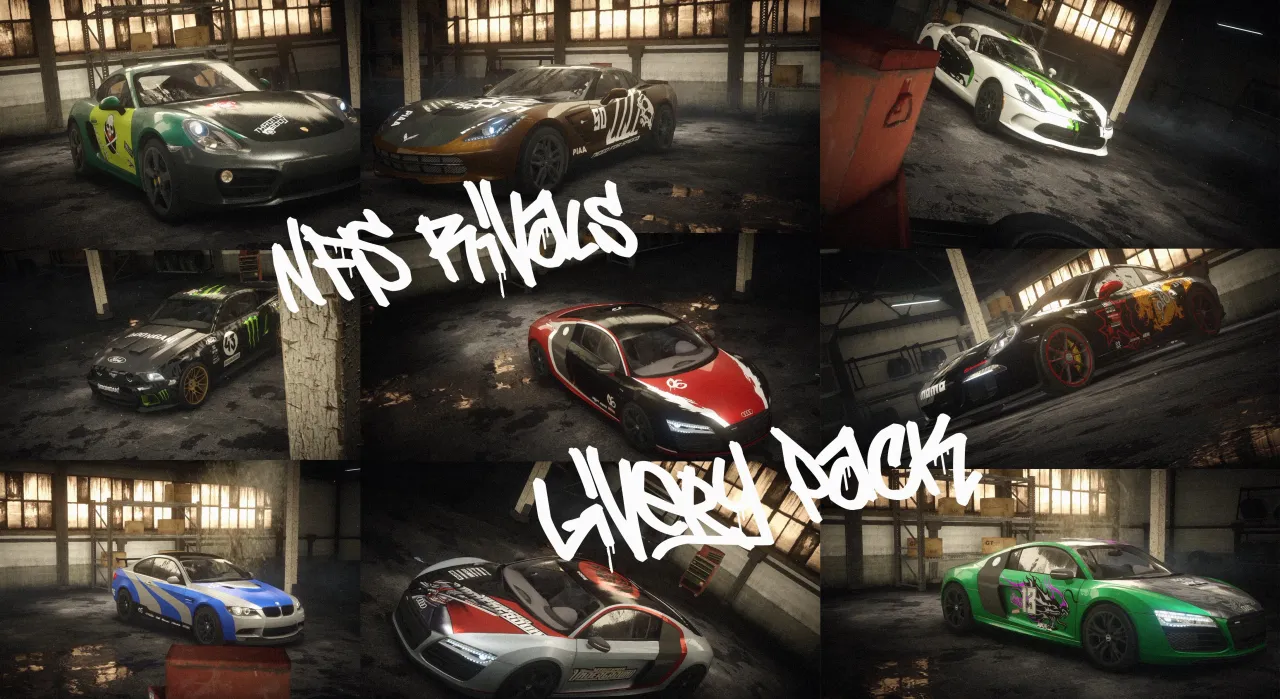
A collection of custom liveries created for **Need for Speed Rivals**.
This pack adds custom designs to the game, giving the cars a fresh and unique look while keeping the original game models intact.
## 📦 Installation
### Requirements
* Need for Speed Rivals (PC)
* Frosty Mod Manager
### How to install
1. **Download the livery pack** and extract the `.zip` / `.rar` file.
2. Open **Frosty Mod Manager**.
3. Select your **Need for Speed Rivals** game executable if Frosty asks you to locate it.
4. In Frosty Mod Manager, click **Import Mod(s)**.
5. Select the downloaded `.fbmod` file.
6. The mod will appear in the **Available Mods** section.
7. Double-click the mod or move it to the **Applied Mods** section.
8. Click **Launch** in Frosty Mod Manager.
9. Wait for the game to start and enjoy the new liveries!
> **Important:** Make sure the mod is placed in the **Applied Mods** section before launching the game.
## 🔧 Compatibility
This mod was created for the **PC version of Need for Speed Rivals** and requires Frosty Mod Manager.
If you experience problems, make sure you are using a compatible version of Frosty Mod Manager and that the game launches correctly without mods.
## ⭐ Credits
Created by **Ghost34**
If you enjoy the pack, consider leaving a rating and sharing your screenshots!
More custom NFS Rivals mods coming soon. 🏁
Comments

n60823 (August 22, 2026 @ 18:04)
Can you please give me your discord? Im looking for people to help me make vinyls for my mod, thanks in advance
MattSTS (August 19, 2026 @ 01:45)
Fantastic job! Rivals really needed these