[NFSC] NextGenFX: ÆTMOFORGE
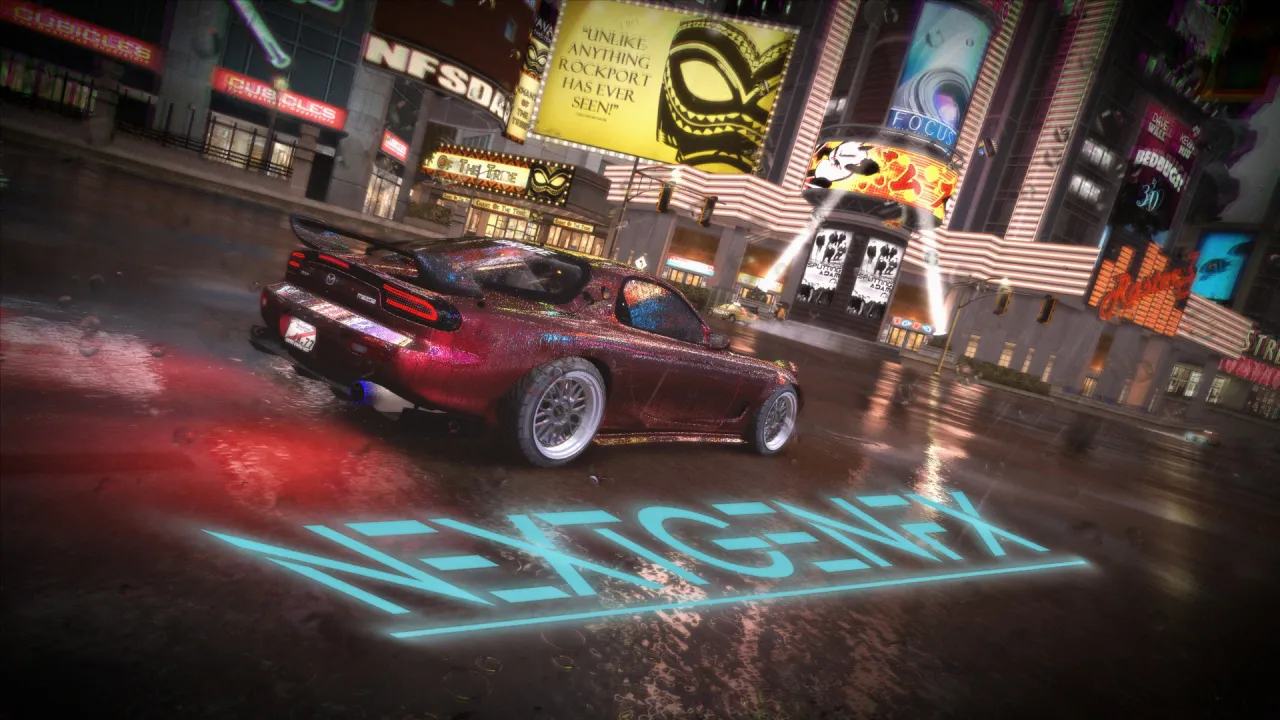
This is a mod that completely changes how the game Looks and feel.
Since this is my first mod ever, feel free to give me some ideas on how to improve it.
First of all, i want to give a Special thanks to everyone who helped me and set the base:
-----------------------------------------------------------------------------------------------
- Xan/Tenjoin (decompiled shaders)
- BlueSkyWest (explaining some code)
- PAIN (some ideas)
- Good Shit (idea for Fixing flare-rotation direction)
- UNLOCALIZED (some ideas of how to fix certain szenarios)
Requirements:
-----------------------------------------------------------------------------------------------
- HD REFLECTIONS
- WIDESCREENFIX
- UNLIMITER (when using EC+ V4+)
How to set-up the mod:
-----------------------------------------------------------------------------------------------
Install Guide
- delete FX folder (in game root Folder) if existing
- !! IMPORTANT !! delete Texture_Shader_Loader.asi in SCRIPTS folder, if existing
Vanilla install:
- install widescreenfix and hdreflections first!
- copy FX Folder, SCRIPTS Folder and dinput8.dll in game root Folder, replace files if asked for
- install new Filters with Binary from "Filter" Folder (uninstaller also located there)
- (Bonus) install new Flares from "Flares" Folder (uninstaller also located there), install VANILLA_INSTALL(or _UNSINSTALL) script with OGVI
SunRise/REDUX Install:
- copy FX and SCRIPTS Folder to game root Folder
- replace files if any
- (Bonus) Install new Flares from "Flares" Folder (uninstaller also located there)
Emitter Overhaul:
- make a backup of your global folder first
- install each part by number with OGVI (ignore all errors if there are any, all is fine):
1. emitterdata
2. emittergroup
3. simsurface
3.1 simsurface(W2C) (if Wolrd 2 Carbon mod is used)
How to customize the mod:
-----------------------------------------------------------------------------------------------
- press the insert key (ins), then a menu should pop up
!! DO NOT TOUCH THE SHADER-FILES OR YOU ELSE YOU CAN BRAKE THE MOD IF YOU DONT KNOW WHAT YOU DOING !!
Features:
-----------------------------------------------------------------------------------------------
- better Motionblur
- reimagined "HDR"
- Vignette
- Tonemaps
- Chromatic Aberration
- CAS-Sharpen shader
- Film-grain shader
- Bloom shader
- Color desaturation shader
- Adjustable Cliff-Fall, Cop-Engangement and Speedbreaker Effects
- Standalone Color Grading
- Color-Temperature Adjustment
- Brightness and Contrast Control
- Auto Exposure
- God-Rays (SunRise-Mod only)
- & more
- balanced brightness-levels to Luma 709
- better particle shader for better Flares and smoke: Bugs (particle Scrolling, particle flickering and more) fixed!
- improved log to linear colorspace decompression
- improved screenefect shader for better road reflections
List of what added and changed:
-----------------------------------------------------------------------------------------------
In this Update:
- more Controll through added GUI: no more switching to the shader files to edit them
- added Godrays (SunRise-Mod needed!)
- added Auto-Exposure
- improved Colorgrading with HSL, Curve and more
- improved Motion-Blur; now in XBox 360 Style
- improved Chromatic Aberration to have 2 modes: nos only & allways on
- improved Bloom Shader
- improved FakeHDR: adjusted its curve to be more precise
- improved Lens-Dirt Effect
- & more
!! YOU HAVE PERMISSION TO USE THE MOD IN MODPACKS AS LONG AS PROPS ARE GIVEN !!
!! YOU ONLY HAVE PERMISSION TO SHARE YOUR OWN CONFIG-FILE AND COLORGRADINGS !!
!! WHEN CHANGING ANYTHING ON THE CODE, ATLEAST CREDIT ME !!
Recommended Mods:
-----------------------------------------------------------------------------------------------
- SUNRISE
- EXTENDED CUSTOMIZATION
- RX7 SPIRIT-R
- PROJECT PALMONT
- RETEX CUSTOM PAINT
- LUT Filter Pack
- Retex v2
- W2C
Comments

yukiman (November 26, 2024 @ 14:06)
@HellRaven, does this work on the current version of redux? its using the extended customization v3
HellRaven (November 21, 2024 @ 23:25)
@Zethras can happen, dont worry
Zethras (November 21, 2024 @ 23:02)
@Hellraven please disregard my previous message; I did everything you said, but since I'm dumb as a dump trunk I did not set the visual treatment to high. Doing it enabled the effects xD
HellRaven (November 21, 2024 @ 19:46)
@ZethrasCurrently it just applies default settings. You need to change them in visualtreatment.fx
also you need to have either shaderloader installed or enabled Compile shaders in ExtendedCustomization.ini
When you dont have that done you wont ofcourse see any difference
Zethras (November 21, 2024 @ 16:53)
No disrespect meant dude, but I don't see any difference in my game... everything is exactly the same as it was before (I'm using this in combo with PS3 Treatment and Apex)Download
28625f-[NFSC] NextGenFX v3.0.rar (Size: 27.15MB) Latest Version
d04351-[NFSC] NextGenFX v2.1.rar (Size: 4.1MB) Old Version
8524f7-[NFSC] NextGenFX v2.0.rar (Size: 4.1MB) Old Version
7c2a04-[NFSC] NextGenFX v1.3.rar (Size: 2.22MB) Old Version
a4e0da-[NFSC] NextGenFX.rar (Size: 2.22MB) Old Version
1244ac-[NFSC] NextGenFX v1.2.rar (Size: 11.72MB) Old Version
e30896-OPUS VANILLA+ CustomVT v1.1.1.rar (Size: 829.38KB) Old Version
dc46f3-OPUS VANILLA+ CustomVT v1.1.0.rar (Size: 829.21KB) Old Version
6cb380-OPUS_VANILLA+_CustomVT_v1.0.1 (incl. README).rar (Size: 17.94KB) Old Version
f4b24a-OPUS_VANILLA+_CustomVT_v1.0.1.rar (Size: 16.73KB) Old Version